


Tessie — Track your Tesla
4.7320.00 Reviews
App Specs
- Version
- 16.0.29
- Updated On
- License
- Free
- Downloads
- 100,000+
- Developer
- Tessie
- Categories
- Lifestyle
- Platform
- Android
Screenshots
 Analysis by AppCompare
When I think about who can comfortably use a car companion app, I look beyond its feature list. The important questions are whether the information is easy to scan, whether tasks make sense when someone is tired or in a hurry, and whether the app fits the way a person interacts with their car. Tessie is a lifestyle app from Tessie for Tesla owners, and its appeal is strongest when you want a more detailed view of your own vehicle rather than another general-purpose driving tool.
Readability and navigation in daily use
The app brings vehicle information and controls into one place, which can be more convenient than switching between separate tools for trips, charging, and remote actions. In practice, the value of that arrangement depends on the task: checking a charge is a quick glance, while making sense of longer-term energy patterns takes more attention. I’d treat the dashboard as a starting point, then open the relevant history or analytics only when I have time to interpret it.
For a driver who likes numbers, the records can help connect habits with outcomes. For someone who finds dense charts tiring, the same detail may feel like extra work rather than clarity. I’d begin with just a couple of useful measures—such as charging costs or trip efficiency—before trying to follow every available statistic. That keeps the app focused on questions that matter to you instead of turning each drive into a data review.
Different sensory and motor preferences
Remote actions are useful partly because they can reduce the need to walk back to the car or handle a physical control in the moment. A driver with limited reach, fatigue, or difficulty using a key can appreciate being able to lock the vehicle or open the trunk from a phone. At the same time, using a touchscreen still requires a person to locate and activate the right control, so I would not assume the app removes every physical or dexterity barrier.
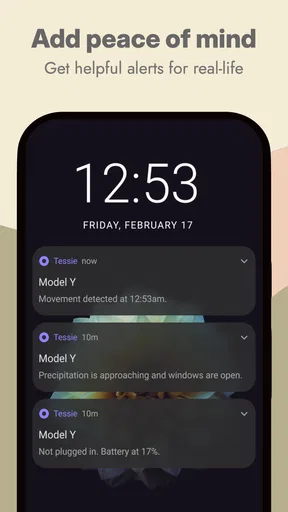
Sound and visual alerts can also matter differently from one person to another. A notification may be helpful when you are nearby and waiting for a charge, but less useful if you rely on a different cue or keep your phone quiet. I’d check how the app’s alerts fit your own routine rather than depending on one notification as the only sign that something needs attention. That is especially sensible when charging away from home or when a change in plans would be inconvenient.
Situational access: home, work, and travel
A realistic use case is finishing work and wanting to know whether the car has charged enough for the trip home. Instead of walking out to check, you can look at the charging information on your phone; if you need to prepare the cabin or secure the car, remote controls may help too. The benefit is not that every step becomes automatic, but that you can make a decision before reaching the vehicle.
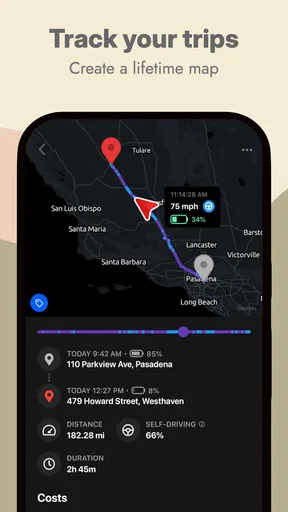
Trip history has a different kind of usefulness. If you drive for work, reviewing journeys can help you organize records, while a household that shares a Tesla may use trip and charging patterns to understand how the car is being used. I’d still review any record before relying on it for reimbursement or formal bookkeeping: a useful log is not the same thing as an approved expense report. On a road trip, charging history and energy use can help you reflect on the drive, though I would not let app analysis distract me from navigation or road conditions.
Worth Reading Before You Choose

Flipboard Shows What News Apps Must Do Beyond the Feed

Switching to Android Auto Means Rethinking Your Driving Routine

Google Calendar Makes a Crowded Week Easier to Manage

Ludo King Makes the Most of the Minutes Between Plans

Baby Panda World Brings Quick Play to Modern Phones, but Its Game Library Feels Busy

ESPN’s Live Game View Makes Following Close Games Easier
Where the convenience has limits
The most important trade-off is that Tessie is designed around Tesla ownership. If you do not have a Tesla, there is little reason to choose it over a broader driving or vehicle-management app. Even for owners, the standard Tesla app may be enough if you mainly need occasional basic controls and do not care about deeper logs or comparisons. Tessie makes more sense when its extra detail is something you will actually use.
It also asks you to be comfortable putting vehicle information and remote actions in a phone-based workflow. Before making it part of a routine, I’d take time to understand the controls and decide which alerts are worth keeping. That small setup effort can prevent a cluttered notification stream or accidental taps. People who prefer fewer screens, have limited access to a smartphone, or want a paper-simple recordkeeping method may find the usual alternatives easier.
What Makes Tessie Stand Out?
From the moment you open Tessie, you’ll notice how intuitive and sleek the interface is. It's designed to be as seamless as the car itself. The app syncs effortlessly with your Tesla, providing you with real-time data and insights. Whether it's tracking charging sessions or monitoring your driving habits, Tessie has got you covered.
Detailed Insights and Analytics
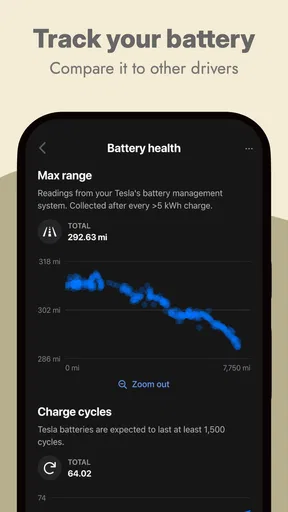
One of the coolest features is the in-depth analytics. You can track your energy consumption, compare it with other Tesla owners, and even see how weather conditions affect your drive. It’s like having an energy auditor in your pocket. The app also lets you set goals for efficiency, which is fantastic for those of us who love a good challenge.
Remote Control Features
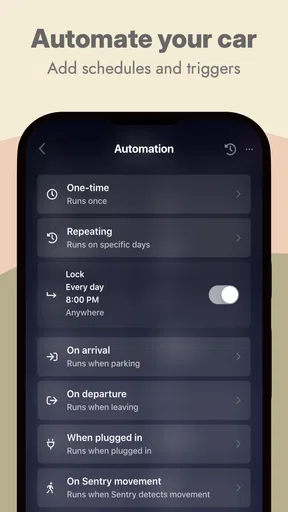
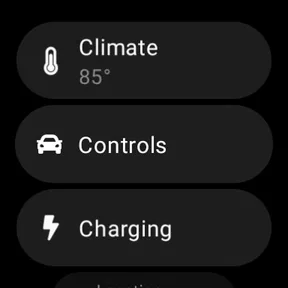
Ever wanted to pre-cool your car on a hot day? Or maybe warm it up before you get in during the winter? Tessie lets you do all this and more with just a few taps. You can lock or unlock your car, open the trunk, and even flash the lights—all remotely. It’s like having a magic wand for your Tesla.
Trip Logging and History
Tessie also excels at trip logging. Every journey you take is recorded with detailed stats, including distance, efficiency, and cost. This feature is perfect for those who love to keep track of their road trips or need detailed logs for business travel. Plus, it’s a fantastic way to look back and see how much you’ve accomplished with your Tesla.
Charging Insights
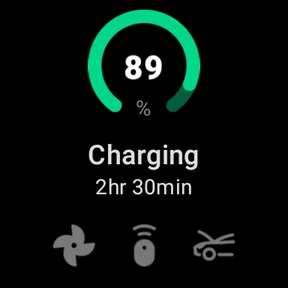
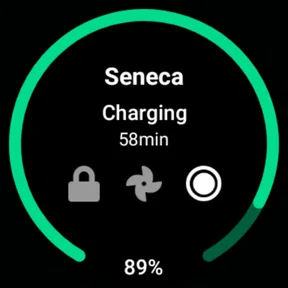
Charging your Tesla has never been more informative. Tessie gives you insights into your charging patterns, costs, and even provides suggestions on how to maximize your charging efficiency. The app alerts you when your car is fully charged or if there’s an issue with the charging process. It’s like having a charging guru at your disposal.
Community and Support
One thing I really love about Tessie is the community feel. You can compare your stats with other Tesla owners, join discussions, and learn from the wealth of knowledge out there. The app also offers top-notch customer support, so you never feel stranded if you run into any issues.
Personalization and Customization
Tessie understands that no two drivers are alike, which is why it offers a range of customization options. You can set up personalized alerts, choose which stats to track, and even customize the app’s interface to match your style. It’s all about making the app work for you.
Who benefits most from the extra detail?
I see Tessie as a better fit for owners who enjoy understanding the patterns behind everyday driving, not just issuing an occasional command. Someone with a regular commute can compare how different routines affect energy use; a driver who charges in several places can keep an eye on costs; and a household with more than one regular driver can use the history to discuss how the car is being used. These are practical reasons to return to the app, rather than collecting data for its own sake.
A useful habit is to review charging and trip information at a calm moment, perhaps at the end of the week, instead of trying to interpret it while getting ready to leave. If you are tracking a change—such as a new commute or a different charging routine—compare similar trips where possible. Weather, route, and driving conditions can all affect efficiency, so a single unusually high or low figure is not a verdict on your habits.
Choosing between Tessie and simpler options
Compared with the usual alternatives in this space, the main distinction is emphasis: Tessie combines remote vehicle actions with a more analytical view of driving and charging. The official Tesla app is the natural baseline for owners who just want straightforward access to their car. A spreadsheet or notes app may be better for someone who wants a small, manually controlled record, while a broad vehicle app may suit a household that manages cars from different makers. I would choose Tessie when Tesla-specific history and insights justify adding another app to my routine.
There is a learning curve in deciding which information deserves attention. The richer the record, the easier it is to spend time comparing figures that do not change a decision. I would set a simple purpose first: understand charging costs, keep a useful trip record, or check a remote function. If the app does not help with that purpose after a fair try, the built-in option may be less distracting.
Practical questions before making it a habit
Is it useful if I only want to control the car? It can be, but its broader analytics are likely to matter less if you rarely review them. Is it a good fit for work travel? The trip history can be a helpful starting record, but I would verify entries and follow the employer’s expense process rather than treating the app as formal documentation. Does it suit someone who avoids charts? Possibly, if the main attraction is remote access, though the analytical side may feel unnecessary.
What should a new user do first? I’d start with the tasks that solve a real annoyance, then adjust alerts and displayed information so the app remains readable for you. If several people use the car, agree on who is responsible for checking charging or trip records; shared access does not automatically create a shared routine. And if smartphone interaction is itself a barrier, or you need a very simple interface with minimal information, relying on the car’s standard controls and official app may be the more comfortable choice.
Overall, Tessie is more than just an app; it's a companion for your Tesla journey. It’s packed with features that not only enhance your driving experience but also make your life a whole lot easier. If you haven’t tried it yet, I highly recommend giving it a whirl. Trust me, once you do, you’ll wonder how you ever managed without it.
Whether you’re a seasoned Tesla owner or new to the electric vehicle scene, Tessie is the app that brings it all together. So, why not give it a shot and see how it transforms your driving experience? You won’t be disappointed.
Cost, compatibility, and my inclusive verdict
The app is free to download, with in-app purchases ranging from $3.99 to $499.99 per item, so I would check the purchase options carefully before committing to anything. It has an Everyone age rating, has been available since June 4, 2020, and its current version is 15.8.1. It supports devices running Android 8.0 or later. I’d also keep the phone itself in mind: a compatible operating system is only one part of whether the app feels comfortable to use, since screen size, text settings, and a person’s preferred input method affect the experience.
Its average rating is 4.6 from around 6,400 ratings, with 307 written reviews and over 100,000 installs. Those figures suggest an established audience, but they cannot tell me whether the interface will suit a particular person’s vision, dexterity, attention, or sensory preferences. I’d try the basic workflow that matters to you and judge it by how easily you can find and use that information in your real routine.
For me, the strongest case is a Tesla owner who wants remote controls plus a more thoughtful record of trips and charging, and who is comfortable reviewing information on a phone. The weaker case is someone who wants only the simplest possible car access, does not use analytics, or encounters barriers with touchscreen navigation. The best choice is the one that lets you manage your car safely and comfortably; Tessie can be a useful fit, but it does not need to be part of every Tesla owner’s setup.
Pros
- Intuitive interface for easy navigation.
- Real-time updates on Tesla's status.
- Customizable notifications for alerts.
- Compatible with multiple Tesla models.
- Secure data encryption for privacy.
Cons
- Limited features in free version.
- Requires constant internet connection.
- Occasional sync issues reported.
- High battery consumption on older devices.
- Subscription model might deter some users.
FAQs for Tessie — Track your Tesla
What features does Tessie offer for Tesla owners?
Tessie provides a comprehensive suite of features for Tesla owners, including real-time location tracking, charging statistics, and energy consumption analysis. It also offers smart alerts for maintenance, driving efficiency tips, and integration with smart home devices. The app aims to enhance the overall Tesla experience by offering detailed insights and control.
Is Tessie compatible with all Tesla models?
Yes, Tessie is designed to be compatible with all Tesla models, including Model S, Model 3, Model X, and Model Y. The app constantly updates to ensure compatibility with the latest software updates from Tesla, providing a seamless experience for all users regardless of their vehicle model.
How does Tessie ensure user data privacy and security?
Tessie prioritizes user data privacy and employs robust security measures to protect personal information. The app uses encryption to safeguard data transmission and storage. Additionally, Tessie adheres to strict privacy policies and does not share user data with third parties without consent, ensuring peace of mind for its users.
Can Tessie help improve my Tesla's energy efficiency?
Absolutely! Tessie offers valuable insights and recommendations to help improve your Tesla's energy efficiency. It analyzes driving patterns and provides tips on how to maximize range and minimize energy consumption. Users can track their efficiency over time and make informed decisions to enhance their vehicle's performance.
Is there a subscription fee for using Tessie?
Yes, Tessie operates on a subscription model, offering several pricing tiers based on the desired features and level of access. Users can choose a plan that suits their needs, with options for monthly or annual billing. The subscription ensures continuous updates and access to premium features, enhancing the overall Tesla experience.


